iDaft Jamming-Daft Punk Sounds
- 3.8
- Rating
- 1.00M
- Installs
- Free
- Price

 Analysis by App-foxy
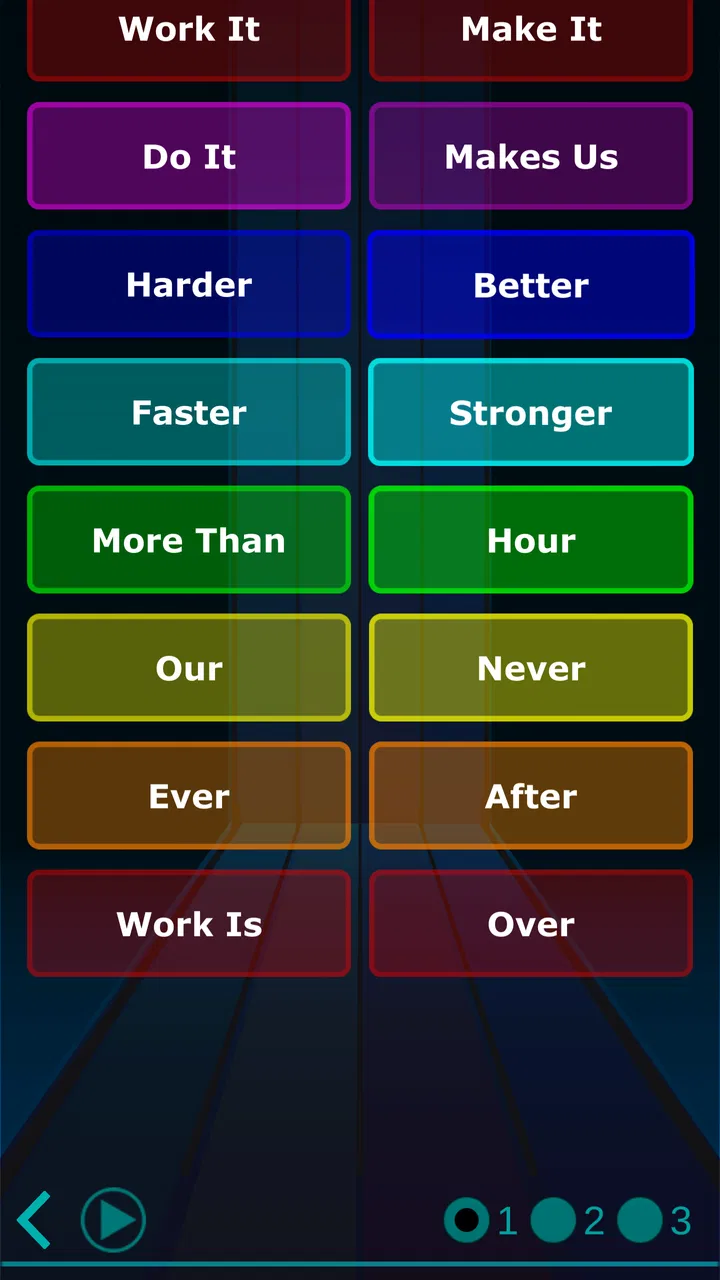
I approached iDaft Jamming-Daft Punk Sounds as a small music game rather than a full rhythm title, and that distinction matters from the first tap. It is a soundboard built around the recognizable style of Daft Punk, so the pleasure comes from arranging sounds, testing combinations, and making a short personal jam. I would not install it expecting a campaign, a long progression system, or a replacement for a complete music-production workstation. I would install it when I want an immediate, playful way to experiment with electronic sounds.
The game is free to start, carries an Everyone age rating, and comes from Drohm. Its audience is broad: a Daft Punk fan may enjoy the familiar atmosphere, while someone who has never used a soundboard can understand the basic appeal quickly. The app has passed one million installs and holds an average rating of 3.6 from roughly six and a half thousand ratings, which suggests a product with a clear niche but also some limitations that are worth understanding before you commit time to it.
What to expect when you open the soundboard
The best way to think about this music game is as a hands-on tribute. You are not being asked to master a conventional rhythm chart or follow a story. Instead, the experience is about tapping musical elements and hearing how they sit together. That makes the first few minutes unusually accessible. There is no need to know music theory, and you do not need to prepare a playlist or connect another service before trying the central idea.
You May Also Like

 Blood Strike: 2.5 Anniversary
Blood Strike’s Loadouts Turn Every Drop Into a Tactical Gamble
A close look at Blood Strike’s custom loadouts: how fast access to signature weapons reshapes its battle royale rhythm, rewards preparation, and narrows the gap between fights.

 Pandora - Music & Podcasts
Pandora’s Music Is Easy to Start, but Harder to Recover
Pandora’s strength is its low-effort path from a seed to a station. Its weak spot is how much confidence it asks you to place in connection, setup, and quiet recovery.

 8 Ball Pool
 Is Built on Rivalries, Rematches, and Routine
A close look at the rivalries, rematches, shared routines, and unanswered safety questions that turn a quick pool match into a persistent mobile community.

 Samsung Music
’s Quiet Strength Is Playing What You Already Own
Its reach comes less from spectacle than from dependable access to a personal library. That simplicity is both the app’s strongest retention engine and its ceiling.

 AccuWeather: Weather Radar
AccuWeather Review: A Quick, Clear Forecast for Everyday Decisions
For everyday plans, the best forecast is the one you can understand quickly. AccuWeather makes rain timing, radar, and local conditions easy to act on, with a few trade-offs.

 Hill Climb Racing
Why Hill Climb Racing Still Turns Crashes Into One More Run
A tiny car, a bumpy hill and one more upgrade: Hill Climb Racing keeps resurfacing because its simple chaos makes every near-miss feel personal.
More From Our News Desk
View All News


I like that the concept is immediately understandable. A soundboard can be picked up casually, used for a few minutes, and put away without losing progress or feeling that you have failed a level. It works well for a quick break, a playful demonstration to a friend, or a bit of creative noise while waiting for something. The connection to Daft Punk gives the sounds a recognizable identity instead of making the experience feel like an anonymous collection of buttons.
At the same time, the tribute format sets a boundary. If your main goal is to learn piano, build complete original tracks, or practice accurate timing, this is not the right tool. A dedicated beat-making app usually offers deeper sequencing, recording, editing, and export options. A traditional rhythm game offers clearer goals and feedback. This one sits between those categories as a compact musical toy with a fan-focused personality.
That difference also explains why opinions may vary. Someone looking for instant entertainment can find the simplicity refreshing, while someone expecting a substantial game may feel that the experience runs out of surprises. I found it more rewarding when I treated each session as a short experiment rather than asking it to provide hours of structured content.
How the free model affects the first impression
You can begin without paying, which lowers the barrier for curious listeners. The app includes in-app purchases ranging from $0.99 to $9.49 per item, so I would take a moment to understand what is available on the screen before buying anything. For a first-time user, the sensible approach is to explore the basic interaction, decide whether the soundboard is genuinely enjoyable, and only then consider whether an optional purchase adds enough value to your routine.
I would also avoid judging it solely by the number of sounds you encounter in the first minute. Soundboards are deliberately simple on the surface, but their usefulness depends on how well you listen to timing, layering, and contrast. A short session can feel flat if every control is pressed randomly. It becomes more interesting when you give each sound a role and leave enough space to hear how the parts interact.
First setup and the quickest route to a useful session
The current version is 1.8.1, and the listed minimum operating-system requirement is version 9. That makes the starting point relatively straightforward for compatible Android users: install the game, open it, and spend a moment identifying the main sound controls before trying to create anything. I recommend using headphones if you have them, especially during the first session, because small differences between layered sounds are easier to notice when the phone speaker is not doing all the work.
Do not begin by tapping every control at once. That is the most common way to turn a promising soundboard into an indistinct wall of noise. Instead, choose one element that feels like the foundation, let it play long enough to recognize its pulse or texture, and then add one contrasting part. This simple two-step approach gives you a reference point and makes the next choice feel intentional.
A useful first setup is to keep the phone still and place it somewhere you can reach without covering the speaker. If you are showing the app to someone else, portrait handling is less important than making sure both people can hear the result clearly. I also suggest lowering the volume before your first full combination. Electronic sounds can seem modest when tested individually and much stronger once several are active together.
The game is suitable for everyone, but that does not mean every listening situation is equally comfortable. I would use headphones in a shared room if you want to avoid disturbing people, and I would keep the volume moderate during longer experiments. Those are ordinary practical details, but they make the difference between a relaxed first try and an irritating one.
Your first successful action
For me, the first meaningful success is not simply hearing a sound. It is creating a combination that feels deliberate for several seconds. Start with a repeating or grounding element, then add a brighter or more distinctive sound. Once the two parts are playing, resist the urge to keep changing everything. Listen for the moment when they complement each other, then remove one part and bring it back. That contrast teaches you more about the board than random tapping does.
This is also the easiest way to decide whether the app suits you. If you enjoy comparing the full combination with the stripped-down version, you are likely to appreciate the game’s central loop. If you only want a fixed recording of familiar songs, the interactive format may feel less satisfying than simply listening to the original music elsewhere.
One practical trick is to build a short pattern around a single change. Keep most of the arrangement stable and alter only one sound at a time. When the result improves, you know which choice made the difference. This turns a casual soundboard into a small listening exercise, and it is more rewarding than trying to remember a complicated sequence of taps.
Another useful habit is to pause between experiments. Because the app is designed for quick interaction, it is easy to continue adding sounds after the combination has already become crowded. Stopping for a few seconds gives your ears a reset. When you return, you can hear whether the next layer adds character or merely makes the mix busier.
Why the Daft Punk connection helps, and where it may not
The musical reference gives beginners an immediate mental target. Even if you cannot describe the exact production technique, you may recognize the kind of robotic, electronic atmosphere the game is trying to evoke. That makes it easier to judge whether a combination feels convincing. You are not working with completely abstract tones; you are exploring a familiar artistic direction.
For fans, this can be the strongest reason to keep the game installed. It offers a more active way to engage with that sound than pressing play on a normal track. You can focus on a particular texture, build a small arrangement, and share the moment with someone nearby. The app’s appeal is less about technical depth and more about turning appreciation into interaction.
For listeners who do not care about Daft Punk, the experience depends entirely on whether the soundboard itself is appealing. The tribute theme is not just decoration; it shapes the identity of the game. If you want neutral samples, acoustic instruments, or a broad collection of genres, a general-purpose music app will probably serve you better.
Common confusion during early use
The first point of confusion is expecting a conventional game interface. There may be no need to search for a score, a level map, or a win condition. The reward is the sound you create and the process of adjusting it. Thinking in those terms prevents the first session from feeling incomplete simply because it does not behave like a typical arcade or rhythm game.
A second confusion is mistaking simplicity for lack of control. The board may look easy because the actions are direct, but good results still depend on restraint. The difference between an enjoyable loop and a cluttered one often comes from what you leave out. I found that removing a sound can be as useful as adding one, particularly when several elements occupy similar musical space.
Users may also wonder whether they should purchase something immediately. My advice is no. Use the free experience long enough to answer three personal questions: do you enjoy the sound palette, do you like interacting with a board instead of listening passively, and can you imagine returning for short sessions? If the answer to any of these is negative, an optional item is unlikely to change the basic fit.
There is also a difference between “recognizable” and “complete.” A tribute soundboard can capture a mood or a set of musical ideas without functioning like a full version of a song. If you expect a track to unfold exactly as a finished recording does, you may be disappointed. The interactive appeal comes from making choices, not from reproducing every arrangement detail of a studio release.
A realistic everyday scenario
Imagine that you have ten minutes before leaving home and want something more active than scrolling. I would open the game, choose a foundation, add one contrasting layer, and spend a few minutes comparing small changes. I might then show the result to a friend and ask which version sounds cleaner. That is a realistic use case: short, social, and low pressure. It does not require a long uninterrupted session or a commitment to learn a complicated interface.
Another scenario is using it as a gentle introduction to layering for a young listener. Because the age rating is Everyone and the interaction is immediate, a child can understand the cause-and-effect relationship between tapping a control and changing the sound. I would still supervise volume and purchases, but the activity itself can encourage careful listening without turning the moment into a lesson.
It can also work for a fan gathering where people take turns creating brief combinations. The limitation is that the experience is best when everyone accepts its playful scale. If the group wants a polished performance, full song playback, or a recording to edit later, different software will be more appropriate.
How it compares with the usual alternatives
Compared with streaming Daft Punk music, this game is more interactive but far less complete as a listening experience. Streaming is the better choice when you want the finished songs, uninterrupted playback, or careful album sequencing. The soundboard is better when you want to poke at the ingredients of an electronic style and make a small arrangement yourself.
Compared with a general music-making workstation, it is easier to approach and quicker to understand. A workstation can provide more control over tempo, instruments, effects, recording, and arrangement, but that depth also creates a learning curve. I would choose this game for a spontaneous experiment and a production app for a project I intend to save, revise, and develop.
Compared with a rhythm game, it offers less pressure and less formal feedback. There is no reason to chase a perfect score if your goal is relaxed exploration. On the other hand, players who need challenges, unlocks, leaderboards, or a clear sense of advancement may find a rhythm title more motivating.
That trade-off is central to the recommendation. The app is strongest as a compact, themed sound toy. It is not trying to replace the three alternatives above, and I would be wary of choosing it if your main requirement is depth, replay structure, or professional music creation.
Small techniques that make the board more enjoyable
First, create a “before and after” test. Play your base combination, remove one element, and listen to the change before restoring it. This helps you identify which sounds are carrying the arrangement instead of assuming that more active controls always mean a better result.
Second, use a rotation rather than a fixed recipe. Keep one foundation, change the secondary element, and then return to the first variation. This gives a short session a beginning, middle, and return without needing a formal song structure. It is especially useful when you want to demonstrate the app to someone who has never touched it.
Third, treat silence as part of the arrangement. If the interface lets a sound continue after activation, give it room before introducing another. If you keep tapping because the screen invites constant action, the result can become crowded quickly. The strongest combinations often come from a small number of deliberate choices rather than frantic input.
Finally, decide what success means before you start. If success means “make something that sounds pleasant for thirty seconds,” the game can deliver a satisfying session. If success means “produce a finished track I can return to tomorrow,” you should move to a more capable music tool. This clear expectation prevents the most common disappointment.
My recommendation after using it
I recommend this game to Daft Punk fans, curious beginners, and anyone who enjoys playful electronic sound experiments without a demanding learning curve. The free entry point makes it easy to test, the Everyone rating keeps its audience broad, and Drohm has chosen a focused idea rather than trying to become an all-purpose music studio. Its strongest quality is immediacy: you can understand the appeal quickly and begin making choices almost at once.
I would skip it if you need full song playback, advanced composition, recording, detailed editing, or a structured rhythm challenge. I would also skip it if the Daft Punk-inspired identity does not interest you, because the theme is central to the experience rather than a minor visual wrapper. The average rating of 3.6 reflects a product that can be enjoyable for the right person but may feel limited to users expecting a larger game.
For a first-time user, my path is simple: install it on a compatible device, lower the volume, use headphones if possible, begin with one sound, add one contrasting layer, and stop changing controls long enough to listen. Once you can create a combination that feels intentional, try removing and restoring individual parts. That is where the app moves from a novelty into a small creative exercise.
After that first success, decide whether you want more of the same kind of interaction. If you do, the optional purchases can be considered carefully, with the free experience serving as your test rather than an obligation. If you want a deeper musical workflow, keep the soundboard as a quick sketchpad and choose a dedicated tool for serious projects.
My final view is favorable but specific: this is a charming, focused music game for short sessions, fan conversation, and hands-on listening. It does not need to be bigger to be useful, but it does need to be judged on the right terms. Choose it for immediate electronic play, not for a complete studio or a traditional game campaign.
FAQs for iDaft Jamming-Daft Punk Sounds
01What is iDaft Jamming-Daft Punk Sounds?
iDaft Jamming-Daft Punk Sounds is an interactive app that lets users experience the iconic sounds of Daft Punk in a fun and engaging way. It features soundboards with clips from popular Daft Punk tracks, allowing you to mix and create your own sound combinations. It's perfect for fans and aspiring DJs alike.
02Is iDaft Jamming-Daft Punk Sounds free to use?
The app is free to download, offering basic features at no cost. However, it may include in-app purchases or ads to enhance the experience. This could include additional soundboards or premium features, so users should review these options before downloading to understand any potential costs.
03What are the main features of iDaft Jamming-Daft Punk Sounds?
iDaft Jamming-Daft Punk Sounds provides a range of features including multiple soundboards, an easy-to-use interface, and customization options. Users can mix various sound clips, save their creations, and share them with friends. The app also updates regularly to include new features and sounds.
04Can I use iDaft Jamming-Daft Punk Sounds offline?
Yes, iDaft Jamming-Daft Punk Sounds can be used offline once downloaded. This is great for users who want to jam to Daft Punk sounds without needing an internet connection. However, some features like updates or sharing may require online access.
05Is iDaft Jamming-Daft Punk Sounds available on both Android and iOS?
Yes, the app is available for both Android and iOS platforms. Users can download it from the Google Play Store or Apple App Store. It's compatible with most devices, but it's always a good idea to check the specific device requirements and compatibility before downloading.
Pros
- Fun and engaging user interface.
- Wide variety of Daft Punk sounds.
- Offline mode available.
- Easy to use for all ages.
- No ads interrupt the experience.
Cons
- Limited to Daft Punk soundboards.
- No customization options available.
- Lacks advanced music features.
- No updates with new sound packs.
- Not suitable for professional use.

iDaft Jamming-Daft Punk Sounds
Gallery